Secure Folder Lock will not work when you leave an app [One UI 8]
Samsung has taken some rather controversial decisions with the latest iteration of the OS. While the tech enthusiasts were yet to get over the fact that the OEM Unlocking toggle has been removed, the South Korean giant has axed another feature, which, this time, will impact a much wider user base. The feature in contention is Secure Folder.
Secure Folder Lock will not work when you leave an app on One UI 8
You have the option to add the apps of your choice to this space and lock it securely using a PIN, pattern, or fingerprint. That’s not it. You can even encrypt the data inside this space, which will act as an additional layer of security. The moment you leave any app part of Private Space, it will be locked right then and there.

Apart from that, there are a few other ways through which you can lock that app, such as waiting for the timeout, locking your device, or tapping on the overflow icon and selecting Lock and Exit. However, it goes without saying that the ability of Private Space to lock the app as soon as we exit it was the easiest and most straightforward one.

But guess what? Samsung has just removed that feature from One UI 8. So you’ll now have to manually carry out the other three lengthier methods to get this job done. And this might prove to be a security scare in some cases. For instance, I keep all my banking and payment apps in Private Space. Then I can easily switch to any other app, and Private Space would lock that app in the backend.

Unfortunately, that can no longer be the case. So if your device gets stolen while your phone/secure folder was unlocked, then all the secure apps can easily be accessed without any restriction. But couldn’t it be a bug which ight be ironed out sooner than later? Unfortunately not. One of Samsung’s Ambassadors has confirmed that this feature has indeed been removed.
Sorry, but that feature was removed in version 8.0. To request its return, please submit feedback in the Support Tab at the bottom of the Members app. -GaryB82 Galactic Samsung Care Ambassador
For now, you cannot do anything apart from filing a feedback report. But don’t keep your hopes high, that isn’t going to be of much [or rather any] use either, until they get flooded by numerous reports on this topic, which, to be fair, I don’t think is going to be the case.
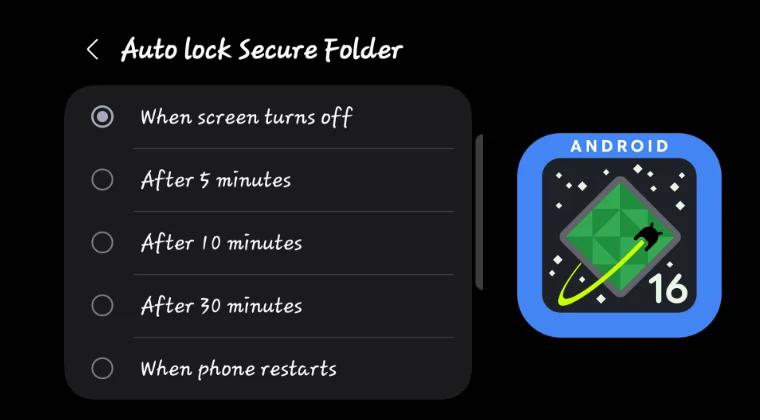
Another fact that will put a stamp of authority over this is the fact that this change was first introduced in Beta , so there was some hope that the feature might make its way back in the stable build, but as you are aware by now, that isn’t the case.
- Battery Information Missing from Samsung One UI 8: How to Fix
- How to Enable Full-Screen Mode in Samsung Dex One UI 8
- Samsung Removes OEM Unlocking from One UI 8!
- Download One UI 8 Android 16 for Samsung Devices
- How to Install One UI 8 via ADB Sideload [Seamless Updates]

(Cancel Reply)
Δ
