The Current KernelSU Version -1 is too low [Fixed]
Recently, I had flashed a custom kernel that comes with the built-in root support via KernelSU. Right after flashing, I booted the device to the OS and installed the latest version of KernelSU. However, upon launching KernelSU, I was greeted with a rather strange message: The Current KernelSU Version -1 is too low for the manager to work properly. Please upgrade to version 22000 or higher! Making matters even more weird is the fact that it showed the status Working, but having version -1.

This message was unusual for several reasons, but the most significant was the fact that there was no version 22000 or higher. The versions are currently 1x and 2x only, not in the lines of thousands! Anyways, I still tried using a different version, even the nightly builds, but none of them spelled out success for me. Then I tried the last tool in my arsenal, and fortunately, that seems to have done the job. So without any further delay, let’s check out the fix.
Fix The Current KernelSU Version -1 is too low
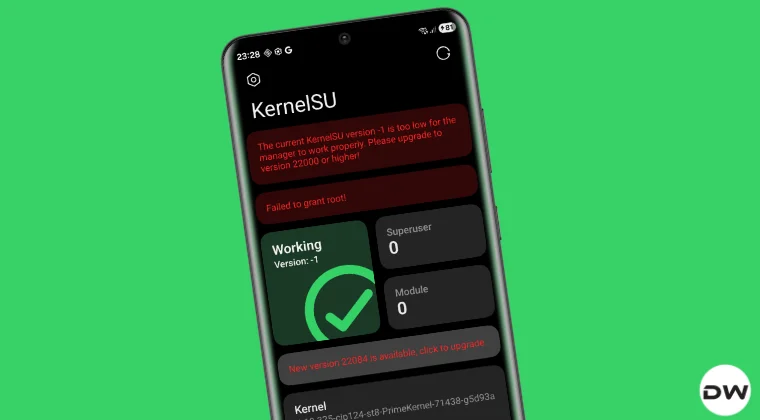
I my case, installing KernelSU Next instead of KernelSU did the job. I did get in touch with the developer, and he responded by saying that he was more concerned about developing the kernel instead of the flashing steps, so it might have been a typo that he had missed. We can’t really blame him after all, can we? Anyways, get the latest version of the KernelSU Next from its official GitHub page , install it onto your device, and launch it. It should now display the Working state.

- How to Spoof Custom Kernel to Stock using KernelSU and SUSFS
- KernelSU SUCompat Disabled/Modules Missing [Fixed]
- KERNELSU V2 SIGNATURE NOT FOUND IN KERNEL [Fixed]
- How to Root via Magisk when it’s Already Rooted via KernelSU
- How to Add Module and Repository to Magisk/KernelSU/APatch

(Cancel Reply)
Δ
