Unbrick Xiaomi 13 Pro via Fastboot Commands
In this guide, we will show you the steps to unbrick your Xiaomi 13 Pro via Fastboot Commands. The newest addition to the Xiaomi family beholds quite an impressive specs sheet and could well give many flagships a run for their money. Moreover, these device is also proving to be quite an active player in the custom development as well. In this regard, you could already welcome abode a plethora of GSI ROMs or gain administrative access by rooting your device via Magisk.
However, this is just one side of the coin as the process does bring in a few associated risks as well. There’s always a chance of things going south and the device being in a soft brick or bootloop state. But even if that, happens, you could easily unbrick your Xiaomi 13 Pro via Fastboot Commands. And in this guide, we will show you how to do just that. Follow along.
- How to Unbrick Xiaomi 13 Pro via Fastboot STEP 1: Download Android SDK STEP 2: Download Xiaomi 13 Pro Fastboot ROM STEP 3: Move Xiaomi 13 Pro Fastboot ROM Files to Platform Tools STEP 4: Boot Bootloop/Soft Bricked Xiaomi 13 Pro to Fastboot Mode STEP 5: Unbrick Xiaomi 13 Pro via Fastboot Commands
How to Unbrick Xiaomi 13 Pro via Fastboot
The below instructions are listed under separate sections for ease of understanding. Make sure to follow in the exact same sequence as mentioned. Droidwin and its members wouldn’t be held responsible in case of a thermonuclear war, your alarm doesn’t wake you up, or if anything happens to your device and data by performing the below steps.
STEP 1: Download Android SDK
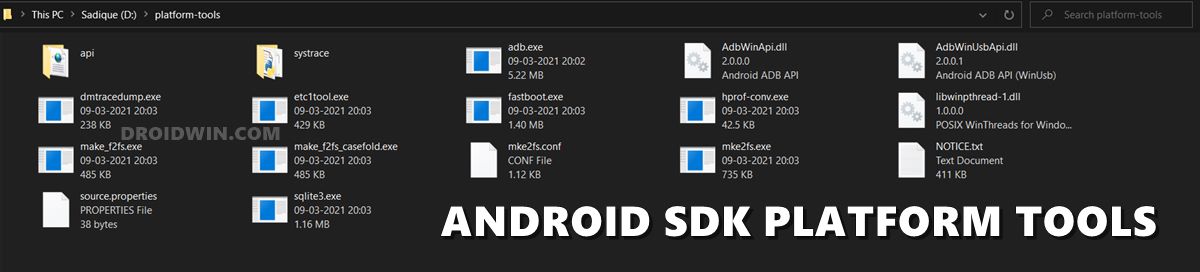
To begin with, download and install the Android SDK Platform Tools . This is the official ADB binary file provided by Google and is used to execute ADB and Fastboot Commands. So download and then extract it to any convenient location on your PC. Doing so shall give you the platform-tools folder, which we will be using throughout this guide.
STEP 2: Download Xiaomi 13 Pro Fastboot ROM
Next up, download the Fastboot ROM for your device. As for this guide, I am using the Xiaomi 13 Pro [nuwa] Fastboot Stable ROM version V14.0.6.0.TMBMIXM [ Direct Download Link ]. You are free to try any version of your choice, but it is recommended to try the newer builds only and of your region. To download the firmware, you may use the official MIUI Forum .
Or if that is inaccessible, you may also take the help of a third-party site such as Xiaomi Firmware Updater. Furthermore, if you wish to understand the Xiaomi Fastboot firmware version, you may refer to our comprehensive guide on What is MIUI Fastboot ROM for Xiaomi, Mi, Redmi, Poco Devices . Or here’s the instruction in short,
- V14.0.6.0 – Firmware version
- T – Android version (T-> Android 13).
- MB – Smartphone model code (MB= Xiaomi 13 Pro)
- MI – Firmware build type (CN for China | IN for India | MI for Global | EU for Europe)
- XM – Firmware version code
Now that you have got hold of the required firmware file, proceed ahead to the next step to unbrick Xiaomi 13 Pro via Fastboot Commands.
STEP 3: Move Xiaomi 13 Pro Fastboot ROM Files to Platform Tools
- To begin with, extract the downloaded firmware file. Once the extraction is complete, you should see the following files:
- So head over to the Images folder and the following files will be present there:
- Select all these files via Ctrl+A shortcut keys and copy them to the platform-tools folder.
- Once done, proceed to the next step to unbrick your Xiaomi 13 Pro device via Fastboot Commands.
STEP 4: Boot Bootloop/Soft Bricked Xiaomi 13 Pro to Fastboot Mode
- To begin with, you will have to boot your device to the Fastboot Mode. The first step for that requires you to power it off.
- If you cannot do so (due to your device being stuck in a bootloop) then the only option left is to let the entire battery drain out (remember the good old days when we could easily remove the battery!).
- Once your device has turned off, press and hold the Volume Down and Power buttons for a few seconds. This will boot your device to Fastboot Mode.
STEP 5: Unbrick Xiaomi 13 Pro via Fastboot Commands
- Head over to the platform tools folder, type in CMD in the address bar, and hit Enter. This will launch the Command Prompt.
- Now type in the below commands, one at a time, in this CMD window [the first command will reset your device, it is compulsory].
- Moreover, if you get any error after executing any of these commands, then don’t leave the process mid-way.
- Rather continue executing the rest of the commands and then check the results.
fastboot -w

fastboot erase boot_ab

fastboot flash abl_ab abl.elf

fastboot flash xbl_ab xbl_s.melf

fastboot flash xbl_config_ab xbl_config.elf

fastboot flash shrm_ab shrm.elf

fastboot flash aop_ab aop.mbn

fastboot flash aop_config_ab aop_devcfg.mbn

fastboot flash tz_ab tz.mbn

fastboot flash devcfg_ab devcfg.mbn

fastboot flash featenabler_ab featenabler.mbn

fastboot flash hyp_ab hypvmperformance.mbn

fastboot flash uefi_ab uefi.elf

fastboot flash uefisecapp_ab uefi_sec.mbn

fastboot flash modem_ab NON-HLOS.bin

fastboot flash bluetooth_ab BTFM.bin

fastboot flash dsp_ab dspso.bin

fastboot flash keymaster_ab keymint.mbn

fastboot flash qupfw_ab qupv3fw.elf

fastboot flash multiimgoem_ab multi_image.mbn

fastboot flash multiimgqti_ab multi_image_qti.mbn

fastboot flash cpucp_ab cpucp.elf

fastboot flash logfs logfs_ufs_8mb.bin

fastboot flash rescue rescue.img

fastboot flash storsec storsec.mbn

fastboot flash toolsfv tools.fv

fastboot flash xbl_ramdump_ab XblRamdump.elf

fastboot erase imagefv_ab

fastboot flash imagefv_ab imagefv.elf

fastboot flash init_boot_ab init_boot.img

fastboot flash super super.img

fastboot flash vendor_boot_ab vendor_boot.img

fastboot flash dtbo_ab dtbo.img

fastboot flash vbmeta_ab vbmeta.img

fastboot flash vbmeta_system_ab vbmeta_system.img

fastboot erase metadata

fastboot flash metadata metadata.img

fastboot flash userdata userdata.img

fastboot flash cust cust.img

fastboot flash recovery_ab recovery.img

fastboot flash boot_ab boot.img

fastboot flash misc %~dp0images\misc.img

fastboot set_active a

fastboot reboot
- How to Root Xiaomi 13 Pro via Magisk Patched init_boot
- Xiaomi Smart Pen Firmware Update Error: How to Fix
- How to Root any Xiaomi/Redmi/Poco via Magisk
- How to Unbrick any Xiaomi/Redmi/Poco via Mi Flash Tool

- Mohamed zidan 2 years ago Reply If the there’s any contact methed? Let me contact u realldreams@yahoo.com
- Mohamed zidan 2 years ago Reply Please sir can u help me I couldn’t do this
- Shahid Mehmood 3 years ago Reply Hi can you please fix / unbrick my Mi A2 Lite. further we can discuss on email
- Shahid Mehmood 3 years ago Reply Hello Can you unbrick my Xiaomi Mi A2 Lite. further we can discuss on email
(Cancel Reply)
Δ
