Unknown Error 1004 Mi Unlock Tool: How to Fix
In this guide, we will show you various methods to fix the Unknown Error 1004 in the Mi Unlock Tool. When it comes to unlocking the bootloader, Xiaomi’s method might be the worst one among all the OEMs out there. Till we had the MIUI, you only needed to wait for 168 hours to get this job done. However, beginning with HyperOS Android 14, things have taken a turn for the worse and are only deteriorating with each new iteration of the OS.

While we already have some nifty workarounds to bypass the HyperOS bootloader unlocking procedure, however, its unlocking tool is itself prone to a few errors and issues. One among them is the Unknown Error 1004 in the Mi Unlock Tool, which is preventing Xiaomi users from unlocking their device’s bootloader. If you are also facing the same issue, then this guide will help you out. Follow along for the fixes.
- Fix Unknown Error 1004 Mi Unlock Tool FIX 1: SIM Card Tweak FIX 2: Use HyperOS 2 Method FIX 3: USB Tweaks
Fix Unknown Error 1004 Mi Unlock Tool
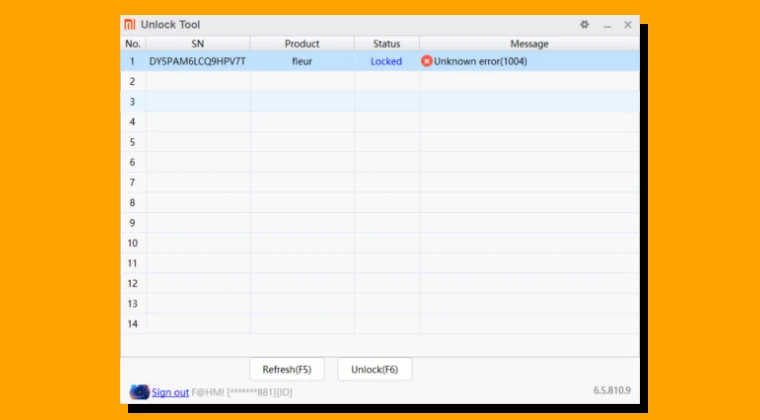
It is recommended that you try out each of the below-mentioned workarounds and then see which one spells out success. So with that in mind, let’s get started. Droidwin and its members wouldn’t be held responsible in case of a thermonuclear war, your alarm doesn’t wake you up, or if anything happens to your device and data by performing the below steps.
FIX 1: SIM Card Tweak
This user shared workaround seems to have the maximum success rate. So I’m quoting it as it is without any modifications, and you should give it a try right away:
It is mainly a device or sim verification problem. First create a xiomi account using only email address, don’t add phone number yet. Then insert a sim card on your phone in slot one whice you will add later. Log in in that phone using the same account you created using only email address and add account from developer option » MI Unlock Status and don’t add phone number yet. Then login to your mi account from mi unlock app on your PC. Then they will ask to add a phone number. Add that phone number of slot 1. Then an sms or call with a verification code will be sent on your phone. Verify. And then try to unlock.
FIX 2: Use HyperOS 2 Method
There exists a nifty workaround using which you can easily bypass the device binding requirement on any Xiaomi device running HyperOS 2 . So, do give it a try and see if it works out in your favor or not.
FIX 3: USB Tweaks
- Couldn’t Verify Device in Mi Unlock Tool: How to Fix This Issue
- Fix Mi Unlock: This device has been activated for less than 7 days
- How to Unlock Xiaomi Bootloader without PC or Mi Unlock Tool!
- Cannot Receive OTP/Verification Code from Mi Unlock Tool [Fix]

(Cancel Reply)
Δ
