WhatsApp to Introduce Memoji For iPhone
It looks like the Facebook-owned messaging giants are on a feature-adding spree. Recently they introduced the fingerprint lock option on Android devices (which was available to iOS users three months prior). Then came the news of the addition of the Instagram like Boomerang feature . And now, it seems WhatsApp is planning to integrate the ever loved emojis, the Memoji, in their app. Read below to know more about this development. Screenshot of the WhatsApp having this feature is also attached. Go have a look.
- What is a Memoji
- What’s New For iOS Users
- How to Access These Feature
What is a Memoji
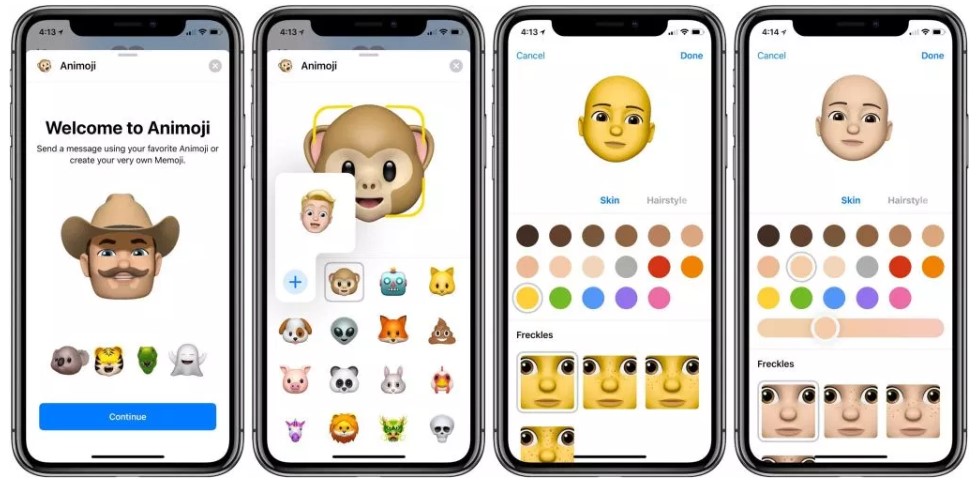
Credits:9to5Mac
One of the most interesting features that came along with the iPhone X was the Memoji feature. It is a combination of Apple’s own Animoji feature (present on iOS 11) plus the ever-popular emoji creator, the Bitmoji. The Memoji allows the user to create custom detailed avatars of themselves, taking the help of the True Depth Camera.
[ Save WhatsApp Status On Your Device, Without Any App! ]
What’s New For iOS Users
According to WhatsAppBetaInfo, (the most trustworthy site for such leaks) WhatsApp is planning to introduce the Memoji feature in its iOS app. Here are a few screenshots for the same:
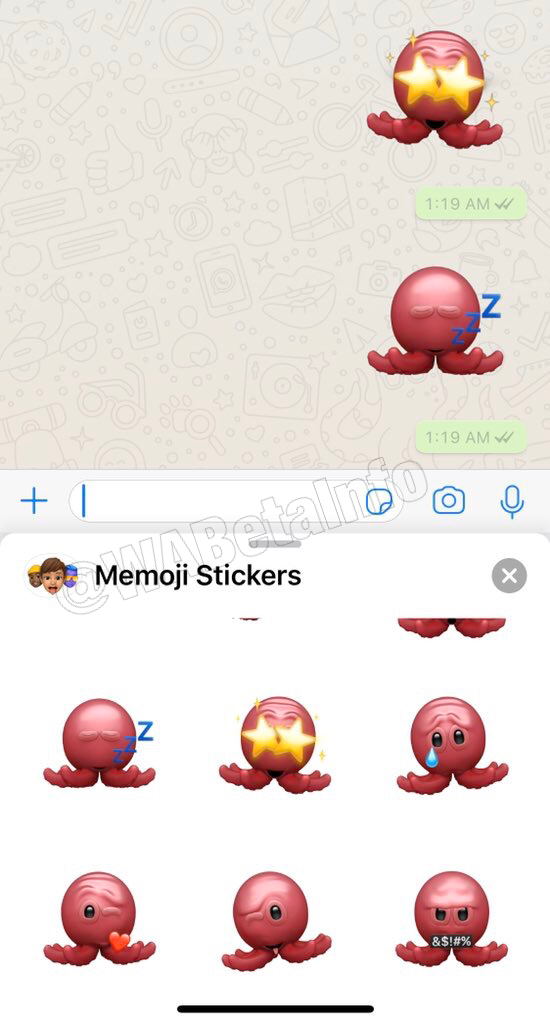
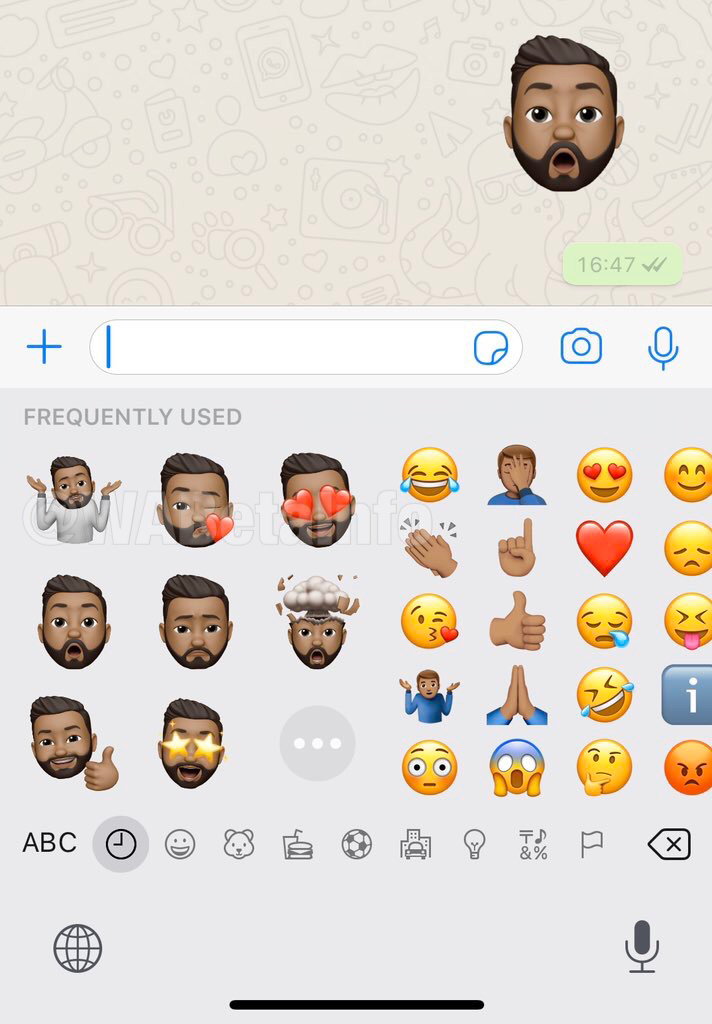
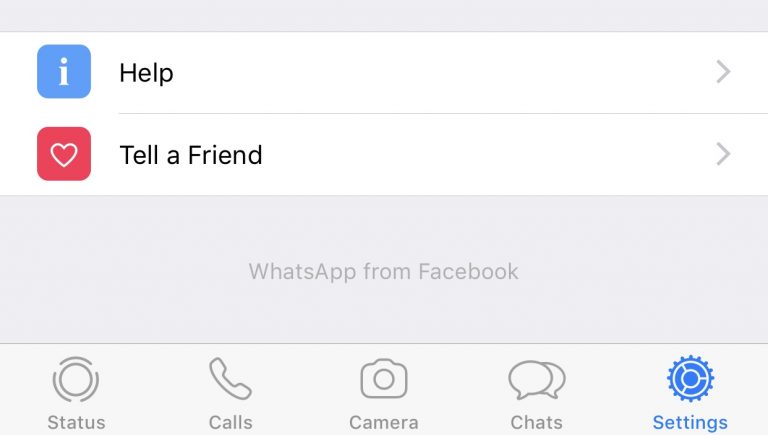
Apart from that, they have also changed the name from WhatsApp to WhatsApp from Facebook . This could be found in Settings. The same was also visible in the recent WhatsApp beta version update for Android.
How to Access These Feature
As is the norm, before releasing for the general public, WhatsApp test these features with a few selected users, known as beta testers. Similar to the beta tester groups for Android, iOS users could join the Test Flight Program. This would make them a part of the beta testers, thereby allowing them to test the latest features. which haven’t been released for the general public till now.
Head over to this link and join the Test Flight Program . Do note that it has a fixed quota of members. Once it gets full, you have to wait until a few members leave the program. This is where Android users manage to score big. Even if their Beta Program is full, they could easily sideload an APK from an external source and install in on their devices.
With that said, the only other option for the iOS users is to wait until the WhatsApp version 2.19.90 gets uploaded to the App Store. This guide will also be updated subsequently.

(Cancel Reply)
Δ
WhatsApp to Finally Launch the Much Awaited Feature [APK Available]
Whenever one thinks of contacting their near and dear ones, probably the only app that comes to their mind is WhatsApp. It is not that the messaging sector is bereft of any competition. The point is, such has been WhatsApp stronghold that the word ‘chatting’ seems to be the new synonym of WhatsApp.
And now, it seems that the communication giants have finally paid heads to one of the most widely requested features. As you might be aware that unlike other social apps, WhatsApp isn’t known to be among the first to launch any new feature. Whether it was the sticker pack, voice calls or video calls, it always took its fair share of time. And this is where it manages to score above its competitor.
It never wants to have a first-mover advantage. Rather, it first tests the app within its developer’s community. These are the members known as Alpha-Testers. Then it moves on to a selected few groups of users (known as beta testers). Finally, if everything is well and good, the app is released for the general public on the Play Store.
And here is one such feature released by WhatsApp which might finally be a cause of concern for its various competitors. Being one of the WhatsApp testers, I have been able to get my hands on this APK with the said feature enabled. But what is this feature all about? Read on further to know more.
[ More Interesting WhatsApp news: Read Here ]
- What Is This Latest WhatsApp Feature All About?
- Steps to Enable the FingerPrint Unlock Feature on WhatsApp
- Does This Hide Everything?
- Could I Hide Messages From the Notification Panel?
- How to Turn off WhatsApp Notifications?
- Will My FingerPrint Data be Misused by WhatsApp?
- Final Thoughts FAQs
What Is This Latest WhatsApp Feature All About?
One reason why some people still go for the Telegram App for communicating is the Safe and secure platform that it provides. By introducing various security mechanisms, such as the 2-Factor Authentication, WhatsApp is surely catching up with the former. And now it has added another important feature in its arsenal. But what explicitly is this feature?
WhatsApp now has added the Fingerprint Lock Feature in its app. Previously called the Screen Lock or Authentication feature, the name probably speaks for itself. Applicable in Android 6.0 and later, every time you open the app, it needs to be unlocked via your fingerprint. But that’s not all.

You could also modify the time period after which you want the said feature to get active. For some, it might be quite annoying to authenticate every time he/she opens his app. But for others who consider privacy as their top concern, they want it to be enabled all the time. Taking this into consideration, the following time span is available to enable the “use fingerprint to unlock” option:
- Immediately
- After 1 minute
- After 30 minutes
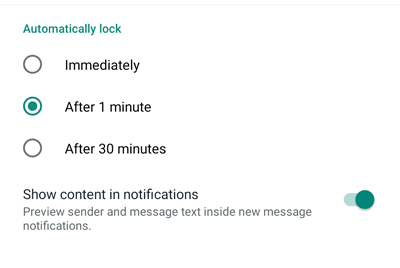
For example, if you chose the ‘Immediately’ option, WhatsApp will enable this feature at that instance. Hence, every time you open the messaging app, you need to unlock it via your fingerprint.
Steps to Enable the FingerPrint Unlock Feature on WhatsApp
It is extremely important to get your hands on the latest beta version of WhatsApp in order for the said feature to work. But being a member of WhatsApp beta tester, I was able to get my hands on the test version of WhatsApp. Download it here:
- Download: WhatsApp for Android v2.19.222 (beta version)
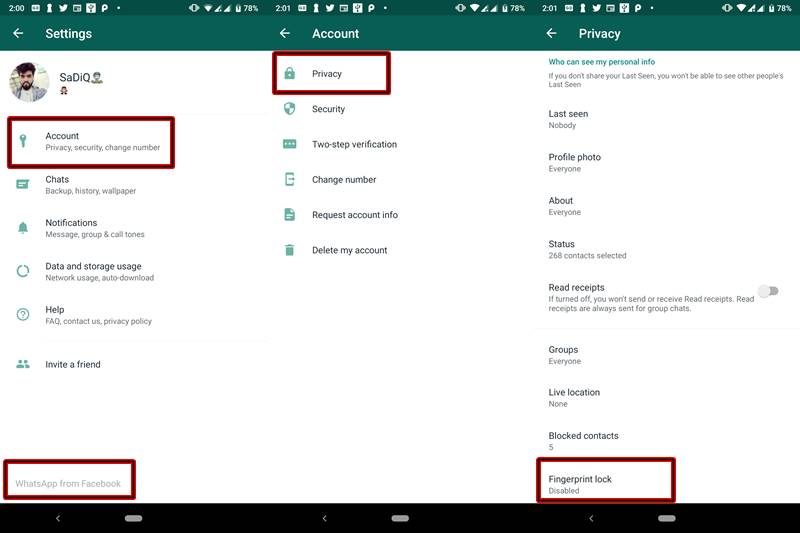
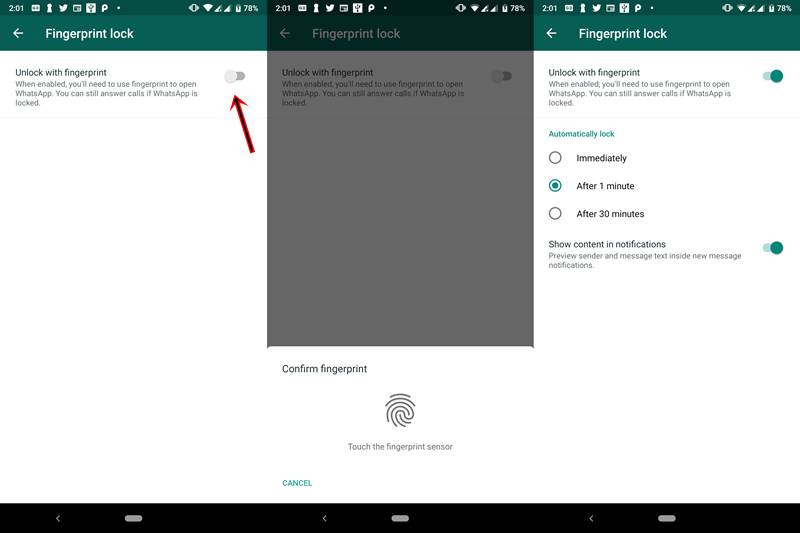
Once downloaded, install it on your device. Then open the app and head over to Settings > Account > Privacy . Under the Privacy Option, you will see a new feature called Fingerprint Lock . Enable the switch next to Unlock with fingerprint to activate this feature on your WhatsApp.
Does This Hide Everything?
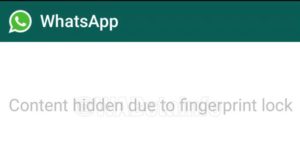
The answer is both Yes and No. Inside the app, everything gets hidden . You will be greeted with a blank screen and a text that says “Content hidden due to fingerprint lock” (see below screenshot). So until you authenticate the app with your fingerprint, you wouldn’t be able to see any messages. That was the obvious part. Now let’s discuss the less obvious one.
Source:WhatsAppBetaInfo
Even after you enable the fingerprint option, you will be in a position to view WhatsApp Messages, the sender info and the message date and time. All this could be viewed from the Notifications panel of your device. But isn’t it a security flaw on the part of WhatsApp? No, it isn’t.
This is because a third-party app has no control over your device’s system menu. Being an external app, WhatsApp can modify whatever it likes with its app, but outside the app, its functionality is limited. The device’s Notification Panel is handled by Andriod System. Hence it is the sole discretion of the System (or to be precise- the users) to show/hide these notifications.
Could I Hide Messages From the Notification Panel?
Although you could easily hide the messages from the notification panel , I would recommend not doing so. this is because WhatsApp is no longer used for casual chit chats. Many important and formal conversations are taking place nowadays on this messaging platform. Turning the notification off will make you completely unaware of the messages being sent to you. You may, therefore, miss out on important events. However, if you still prefer to turn off the notifications, follow the below method.
How to Turn off WhatsApp Notifications?
Given below are two methods to completely turn off Whatsapp notifications. Proceed at your own peril. You could try any of the two given methods. The first method, although short and simple, may work only on the latest Android version. If it doesn’t work for you, try the second alternative. That is the universal method and will work on all the devices.
METHOD 1: Turn off WhatsApp Notifications from the Notification Panel
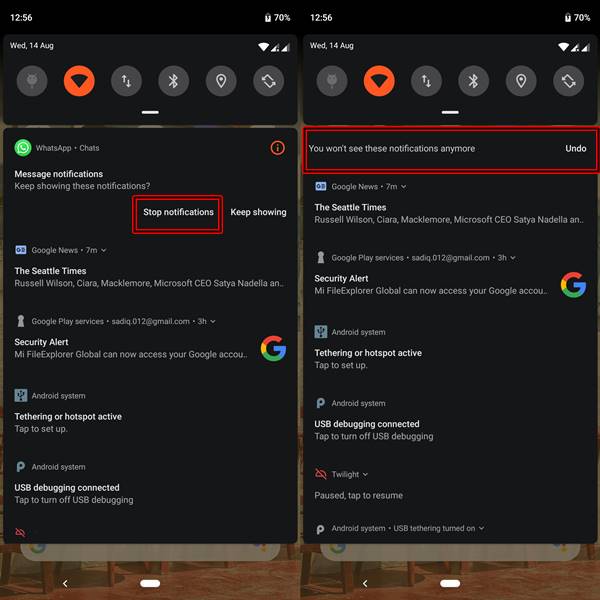
- Long press on the WhatsApp Notification on the Notification Panel.
- You will be greeted with two options: Stop Notifications and Keep Showing.
- Tap on Stop notifications . that’s it. You will no longer be notified about any WhatsApp activity on your device.
METHOD 2: Turn off WhatsApp Notifications from the App’s Setting Menu
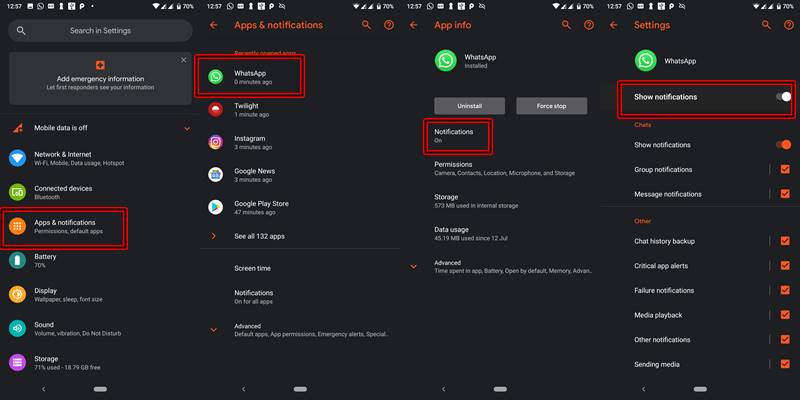
- Go to the Settings menu of your device.
- Navigate to Apps & Notifications or Notifications , whatever option is present on your device.
- Scroll down to WhatsApp and tap on it.
- [On Android 9.0 Pie] Tap on Notifications.
- Disable the toggle which says Show notifications or Block All.
Will My FingerPrint Data be Misused by WhatsApp?

Just like any other Android app, Whatsapp will not be able to access, store, transfer or modify any of your fingerprint or biometrics data. Rest assured, your data is completely safe and will only be stored in your Android System. Once you format your device, the data would also be erased.
Final Thoughts
This is indeed a welcome move by the world’s most popular messaging service. Any act which makes the app more safe and secure will be equally liked by everyone. Hence adding the fingerprint feature to the WhatsApp is a step in the right direction. What do you think? Feel free to voice your thoughts, views, and reactions to this news in the comment section below.
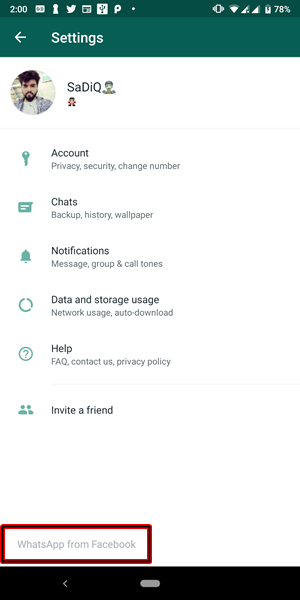
BONUS: In the Latest Version of WhatsApp (v2.19.222), Facebook has also renamed the app name from “WhatsApp” to “WhatsApp from Facebook”. Have a look at the below screenshot.
Q1) Will my pre-installed version of WhatsApp get this update?
No, in order to get the Fingerprint Lock feature, you must be using the WhatsApp Beta v2.19.222. Get it from the Download Section of this post.
Q2) After installing the said version, I am not able to see the Fingerprint feature in my WhatsApp.
If you have installed the version 2.19.222 of WhatsApp but still didn’t got this feature, then head over to Settings > Chats > Chat backup and make a backup of your chat. Then uninstall WhatsApp and re-install it. You should get this feature now.
Q3) Again, no success?
Even after that, if you aren’t able to receive the FingerPrint Lock feature of WhatsApp, then probably wait for the next beta release of WhatsApp. This post will be automatically updated once a new version is released.
(Cancel Reply)
Δ
