Will Rooting a Custom Fails Strong Integrity?
This is one question that I have been asked quite a lot in recent times- “My device is running a custom ROM and I have loaded an unrevoked keybox via the ROM’s spoofing section. As of now, I’m passing the Strong Integrity. But if I proceed to root my Custom ROM, will the Strong Integrity end up failing, or will it have no impact on the ROM”?

While I knew the answer to this question, I still decided to test it out before formulating a concrete response. So I flashed a custom ROM across all my devices- Poco F5, Nothing Phone 2, OnePlus 11, Galaxy S20 Fe, Galaxy A52s 5G, Redmi 13C, and Moto G54. Since this constitutes a large group of test subjects, whatever answer came out could be called a generalised answer as well. So what exactly was the result? Let’s find out.
Will Rooting a Custom Fail Strong Integrity if it’s Already Passing?

The answer to this question is no, rooting a custom ROM will not result in the failure of Strong Integrity if it was already passing it before. In fact, rooting will not have any impact whatsoever on the ROM’s Play Integrity status. This will only stay true if you don’t end up flashing any module or tinker with the device’s partition, because in such cases, there’s a chance of Play Integrity failing the Strong.
But There’s Always a Rare Case
What if rooting ends up failing the Strong Test of your Custom ROM? Well, no matter how rare it is, there’s always a slim chance of things going south. In that case, you’ll have to flash all the modules that you do to pass Strong Integrity in a stock ROM , including the Play Integrity Fork, Tricky Store, etc.
- Keybox Might No Longer Work from February 2026!
- How to Get Fingerprint PIF.JSON File using Play Integrity Fork
- Play Integrity Fix is No More! So What’s Next?
- How to Check Play Integrity Test from Play Store
- What is New A13+ Play Integrity Check and How to Pass It

(Cancel Reply)
Δ
How to Get Fingerprint PIF.JSON File using Play Integrity Fork
In this guide, we will show you the steps to get the fingerprint PIF.JSON file using Play Integrity Fork. A week back or so, we got the unfortunate news that the Play Integrity Fix module has been discontinued by the developer chiteroman. We can’t thank him enough for the invaluable work he has done for this community. But going forward, what can be our next course of action?
Well, while this module was up and running, another developer [osm0sis] was also running a fork of this module, which goes by the name Play Integrity Fork. While we wouldn’t say that it was under the shadow of Fix, but it wasn’t being used that much when compared to its counterpart.

However, all that is about to change now, and so there are a few queries that might pop up in your minds. In this regard, one of the most common questions that I have been asked for the past week is how to get the fingerprint PIF.JSON file in the Play Integrity Fork module.
As you might already be aware, the Fix module already has this embedded in its module; you just need to launch it via KSUWebUI, hit the Fetch PIF.JSON option, and you’ll get the file. But that’s not possible via the Fork module via the direct route. Why? Let’s find out, and after that, we will list the plausible steps through which you can get this file using this module. Follow along.
- Why is the PIF JSON Fingerprint File Missing in Play Integrity Fork
- How to Get the Fingerprint PIF.JSON File using Play Integrity Fork
- Direct Download PIF JSON Files
Why is the PIF JSON Fingerprint File Missing in Play Integrity Fork
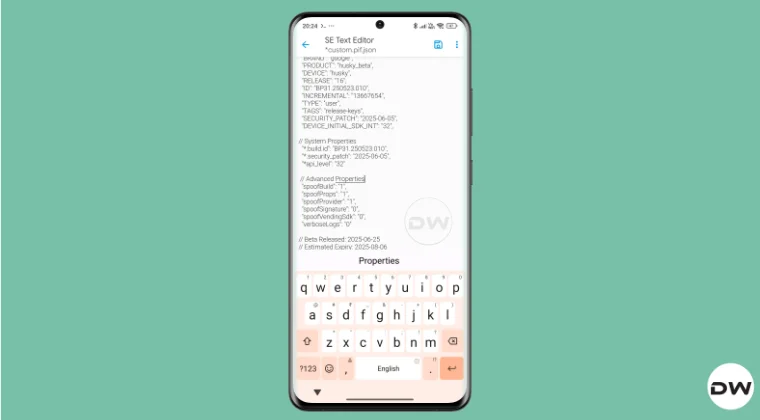
By default, the module comes with a template of a PIF JSON file that you need to fill in manually. You can get this file from /data/adb/modules/playintegrityfix. Once you fill in the values, simply rename it to custom.pif.json, and your task stands complete. But why hasn’t the dev simply added this file, as was the case with the Fix module? Here’s what he has to say regarding this:
There’s intentionally no pif.json in the module because the goal remains to be futureproof, and including something that may be banned and obsolete within days would be contrary to that goal.

However, finding these files might not be everyone’s cup of tea. Not only are a few of these remains, but finding them is also quite an effort taking task. The developer acknowledges this, and hence, he has added a script to extract the latest Pixel Beta fingerprint along with the module. The script is named autopif2, which generates a random device fingerprint from the latest Pixel Beta. So let’s have a look at the steps to make full use of this file.
How to Get the Fingerprint PIF.JSON File using Play Integrity Fork

Before starting, please take a backup of all the data on your device, just to be on the safe side. Droidwin and its members wouldn’t be held responsible in case of a thermonuclear war, your alarm doesn’t wake you up, or if anything happens to your device, and data by performing the below steps.
NOTE: There are quite a few ways of getting this job done, however, I personally found Termux to be the easiest among all of them. But if you want to try out any other method, then run the generation script from a root manager app that supports the module Action button or from a file explorer app that supports script execution.
- To begin with, flash the wget2 module via Magisk / KernelSU / APatch .
- Then, flash the Play Integrity Fork CI module from GitHub Actions .
- Now, download and install the Termux app from F-Droid.
- Then launch it and execute the following three commands: su //you’ll get a SU request, hit Grant cd /data/adb/modules/playintegrityfix //to change the directory to the module’s sh autopif2.sh –preview // this will give you the fingerprint file
- You can also add a few other parameters to the above command, namely: su -c sh /data/adb/modules/playintegrityfix/autopif2.sh -a -m -p -s -a Advanced -m Match -p Preview -s Strong
- Once done, head over to the below location to access the custom.pif.json /data/adb/modules/playintegrityfix
Direct Download PIF JSON Files
If you don’t want to manually carry out the aforementioned steps, then you may directly get the PIF JSON file from our below guide:
Download PIF JSON File from Here
- How to Pass Strong Integrity Using Revoked/Banned Keybox File!
- How to Pass Play Integrity in New Android 13+ Checks
- Guide to Pass Strong Integrity on Unlocked Bootloader & Root!
- How to Spoof/Fake/Hide Bootloader Unlock Status
- How to Pass Play Integrity Test on any Custom ROM [Video]
- Drw 6 months ago Reply Problem solved. Termux wasn’t prompting me to grant su user access. Found where to enable it in the KSU Next GUI under Superuser.
- Drw 6 months ago Reply I’m getting “su program not found.” Rooted with ksu and susfs. Modules installed are BKI, Play integrity fork, shamiko, susfs for ksu, tricky store, wget2, zygisk lsposed, and zygisk next. Nothing tweaked.
- mario 7 months ago Reply sorry, what do you mean with “Then, flash the Play Integrity Fork CI module from GitHub Actions.” ? i have pif v13 flashed in magisk
- Mohamed 7 months ago Reply Hi, can you please help me with a vaild keybox pleaaase 🙏
- Antonis 7 months ago Reply 1) “Then, flash the Play Integrity Fork CI module from GitHub Actions” https://github.com/osm0sis/PlayIntegrityFork/actions what do i download? 2) and then what do i do with custom.pif.json ?
- Antonis 7 months ago Reply “Then, flash the Play Integrity Fork CI module from GitHub Actions” https://github.com/osm0sis/PlayIntegrityFork/actions what do i download?
(Cancel Reply)
Δ
Play Integrity Fix is No More! So What’s Next?
So I was strolling the lanes of GitHub when I stumbled upon the Play Integrity Fix page , and to my absolute astonishment, I was greeted with the error 404 Page Not Found. Since the module was up and running the last time I checked, and there was no sign of any stopping of this project from the developer itself, this all came as a shock to me. So I then went to the developer’s profile on XDA and my worst fears indeed came true, Here’s what the developer of this module, chiteroman, had to say:
I’ve decided to discontinue the PIF project. Google is increasingly putting up more obstacles, and I no longer have as much time to dedicate to this as I used to. It’s been a very interesting journey, and I’ve learned a lot. I thank everyone who has accompanied me and contributed to the project. But things seem to be getting worse, and Google is going to make it even harder to use its services (GMS) on devices with an unlocked bootloader.
So all this begs an important question- what’s next? How can we now pass the Play Integrity Test, and is it even possible to pass this test now? Well, we are here to answer all your queries. Follow along.
- Play Integrity Fix is No More! So What’s Next?
- The Flashing Steps?
- Some Useful Resources
Play Integrity Fix is No More! So What’s Next?

Alongside the Play Integrity Fix module from chiteroman, there is also a fork along the same lines by the developer osm0sis. And it’s not that it’s a newcomer, it has been going pretty strong for the last year and a half, it’s just that since the Fix was getting the job done, most of the users didn’t find the need to jump over to the Fork.
But now that the former is no longer there, you’ll have to make a switch to this. For the unaware, osm0sis is a Senior Recognized Developer / Contributor on XDA and has been doing some great work there, so he is a reputed player in this domain, and his module is also performing well and good, without any issues as such.
Moreover, if there’s an iota of a doubt, then the module is completely open-source; you can have a look at all of its files over at GitHub. Even chiteroman [developer of Play Integrity Fix] says “As an alternative, you can use PlayIntegrityFork”, so this should put all doubts to rest.
The Flashing Steps?

Well, it’s all the same as before- simply download the module ZIP file from its GitHub page [refer to the link below] and then flash it via Magisk/KernelSU/APatch. There’s no additional requirement whatsoever.
Download: Play Integrity Fork from GitHub
Rounding off, here’s what osm0sis [the developer of Play Integrity Fork] had to say to chiteroman [the developer of Play Integrity Fix]:
I know we’ve had our differences, but thank you for all your work, especially for carrying on PIF from kdrag0n and Displax when they lost interest, and all the truly groundbreaking work you did on FrameworkPatch and BootloaderSpoofer, without which we might not have TrickyStore today. I wish you all the best.
So that’s all for this guide regarding Play Integrity Fix’s sad demise. We can only say thank you, chiteroman, for developing such a valuable module and helping us pass the Play Integrity Tests with ease. Until next time, it’s goodbye from us and see you on the Play Integrity Fork’s GitHub page now!
Some Useful Resources
- What is New A13+ Play Integrity Check
- How to Pass Play Integrity in New Android 13+ Checks
- How to Pass Strong Integrity on Unlocked Bootloader & Root! [Legacy Checks]
- Get your Unrevoked Keybox XML File Here | Pass Strong Integrity
- How to Check Play Integrity Test from the Play Store
- Mijing 8 months ago Reply Keybox for Xiaomi 14 please
- Kacper 8 months ago Reply Sir, I kindly ask for a keybox link please.
- Stanley 8 months ago Reply key box request please
(Cancel Reply)
Δ
