You Can Now Launch Graphical Apps in Android’s Linux Terminal
It has been a great few weeks for the tech enthusiast. While Google had added the terminal to the Pixel devices way back in March this year, there wasn’t much development in the initial days. While you can run Debian commands in this Virtual Machine , but that was just about it. With the latest build of Android Canary, the Terminal has been blessed with support for graphical apps!
You Can Now Launch Graphical Apps in Android’s Linux Terminal
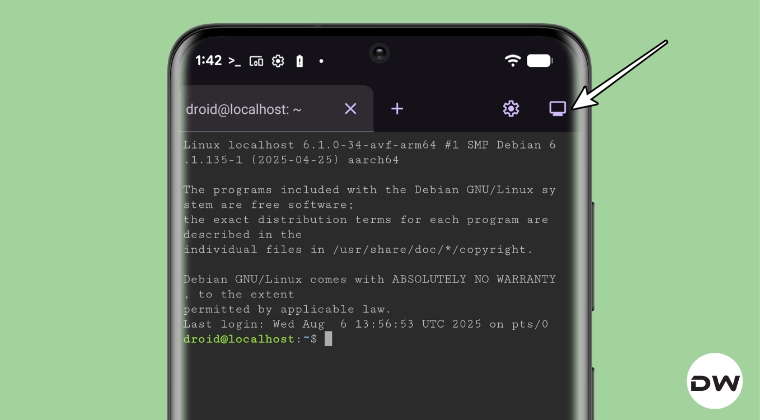
Interacting with its new Display feature [present at the top right of the terminal window] will forward the graphical output from the Linux Terminal to the Android host. Then, using the ‘ weston’ command, you can open the GUI environment in Linux. For the unaware, weston is the reference implementation of a Wayland server the reference implementation of a Wayland server. A Wayland server, in turn, is a display server, a window manager, and a compositor all in one.

Even Google has updated its recent documentation on Android Virtualization Framework, the framework that allows Linux to run in a Virtual Machine. One important point that caught my attention in the note is: “ Android has traditionally been the only major operating system that doesn’t let users develop apps on the platform itself.”

As opposed to Windows and macOS, you cannot develop apps natively on the Android OS because it doesn’t have the support for the necessary software. But all this might soon change. Likewise, you might even be able to run games on your Android, though a lot of work is to be done in that domain, with the major roadblock being the fact that most Android devices still have an ARM CPU. Anyways, this is still a big step taken by Google and will definitely go a long way in their merger of Android OS and Chrome OS.

Rounding off, we would also like to share another important point- the Linux Terminal also doesn’t have support for hardware acceleration by default. But you can easily enable it. Just create an empty file named ‘ virglrenderer ’ and place it in the ‘ /sdcard/linux ’ directory. Now launch Terminal, and if you see the “VirGL enabled” message, then hardware acceleration has been enabled.
How to Install and Run Chromium in Linux on Android
Enough of the theoretical parts, let’s start off with the practical application, shall we? So simply refer to the below guide to run the Chromium Browser in Linux on your Pixel device.
How to Install and Run Chromium Browser in Linux on Pixel
- How to Access Files on Android via New Linux Terminal
- How to Enable and Run Linux Terminal on Pixel [No Root]
- Install Kali Linux Nethunter Kernel on Galaxy S20 FE
- How to Install Kali Linux NetHunter on any Android

(Cancel Reply)
Δ
