YouTube Background Play Not Working on Brave Browser [Fixed]
In this guide, we will show you a couple of handy workarounds that should help you fix the issue of YouTube background play not working on the Brave Browser. It wouldn’t be harsh to say that most of the Brave users are just there for its ability to play YouTube videos in the background, which, in other ways, is a paid/premium feature. Unfortunately, that very same feature is currently not working .
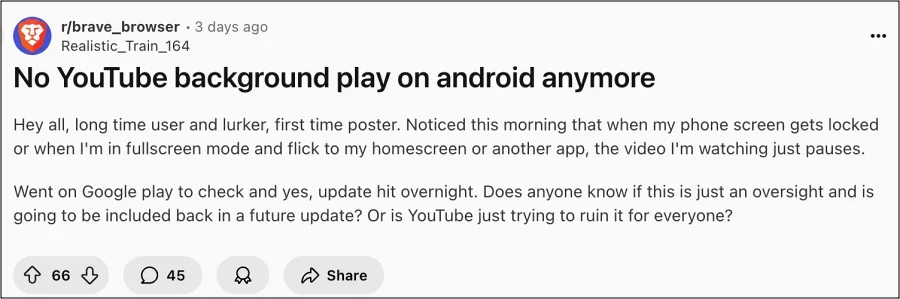
This usually happens when the screen gets locked or when a user switches over to a different app. Moreover, going through the reports, it seems the issue started happening right after the browser was updated to version 1.82.162. So it all but confirms that the culprit is this build of the browser. Until that is officially addressed, we will make you aware of a couple of nifty tweaks that will help you put an end to this issue once and for all. So without any further ado, let’s check them out.
- Fix YouTube Background Play Not Working on Brave Browser FIX 1: Toggle Background Play FIX 2: Switch to Desktop Mode FIX 3: Switch to Brave Nightly
- UPDATE: A Fix is Rolling Out
Fix YouTube Background Play Not Working on Brave Browser

It is recommended that you try out each of the below-mentioned workarounds and then see which one spells out success. So with that in mind, let’s get started.
FIX 1: Toggle Background Play
Your first course of action should be to disable and re-enable the Background Play feature. This refreshes the underlying settings and will rectify the issue that we are currently dealing with. So give it a try using the below listed steps below and check if it works in your favor or not
- Head over to Settings > Media > Turn off Background Play.
- Wait for a few seconds and then turn it back on.
- Now, reset the browser [compulsory] and check out the result.
FIX 2: Switch to Desktop Mode
Some users have also reported that switching to the Desktop Mode also seems to have spelled out success for them. However, this fix only lasted for around 3-4 videos, after which the issue reappeared. So they had to then turn off Desktop Mode and re-enable it to address this issue once again.

FIX 3: Switch to Brave Nightly
Brave Nighyl seems to be unaffected by this issue, so you may consider making a switch to it for the time being. However, do note that this is a testing build and might be unstable. If you are ready to deal with it for the time being, then you may get the browser from here .
That’s it. These were the various methods that will help you fix the YouTube background play not working in the Brave Browser. As far as the official stance on this matter is concerned, the developers are yet to acknowledge this issue, let alone give out any ETA for the rollout of a fix. As and when any of these two things happen, we will update this guide accordingly. In the meantime, the aforementioned workarounds are your best bet.
UPDATE: A Fix is Rolling Out
The YouTube background play issue, which was reported in the Brave version 1.82.162, has been addressed , and a fix is rolling out along with the newer version of this browser, which is 1.82.164. So make sure to update the browser at the earliest.

(Cancel Reply)
Δ
