YouTube Link via Samsung Browser not opening in Vanced [Fix]
In this guide, we will show you the steps to fix the issue of the YouTube video link via Samsung Internet Browser not opening in the YouTube Vanced app. While this popular third-party client has seen the end of the day and would no longer receive any future updates, but that hasn’t stopped the tech enthusiasts from still letting this app have a permanent abode on their devices.
Apart from the ability to block ads and sponsors, it also comes with a slew of nifty features, including the likes of swipe controls, and the dislike counter. However, as of late, a specific set of users aren’t able to make full use of these functionalities. Many users have voiced their concern that upon opening the YouTube video link via Samsung Internet Browser, then tends to open in the official Youtube app instead of Vanced.
This is happening in spite of the fact that the “Open Supported Link” option has already been set to Vanced instead of the official YouTube app. Another intriguing thing to note is the fact that this issue is only happening in the Samsung browser and not in Chrome. So if you are also in the same boat, then this guide will help you rectify this issue. Follow along for the fix.
Fix YouTube Link via Samsung Browser not opening in Vanced

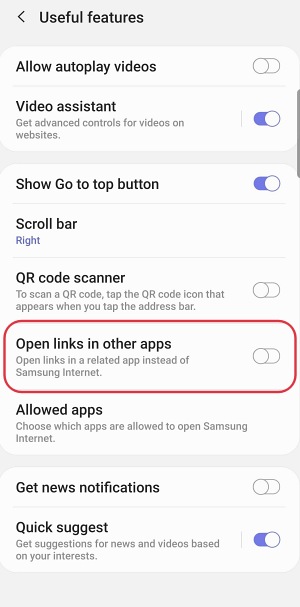
In all other browsers, it simply refers to the “Open Supported Link” setting and carries out the task accordingly. However, when it comes to Samsung’s browser, then you will have to enable one additional option before proceeding ahead. To be more specific, launch Samsung Browser and head over to Settings > Useful Features > enable the toggle next to Open links in other apps.
- How to Use Knox Features/Apps on a Rooted Samsung
- Smart View not working on rooted Samsung: How to Fix
- Bluetooth not working on rooted Samsung: How to Fix
- Banking/Payment Apps not working on non-rooted Samsung [Fix]

(Cancel Reply)
Δ
