YouTube showing 3 videos per row: How to increase it [Video]
In this guide, we will show you the steps to increase the number of videos from the current 3 videos per row on YouTube. This video streaming service from the Silicon Valley giant is quite often in the news, and not for all the right reasons. It is infamous for making major UI/UX changes that no one had asked for in the first place. To make the matter worse, it doesn’t give any granular control to disable or roll back such changes either.
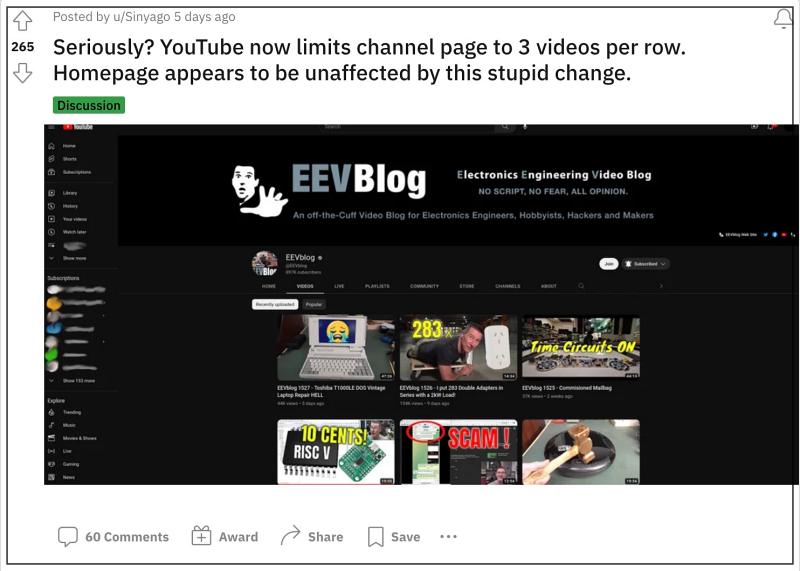
In this regard, it has recently rolled out another major user interface change wherein the YouTube home page as well as the Videos section of a particular channel will only show 3 videos per row. This is in stark contrast to earlier times when you would get anywhere from 4 to 6 videos in each row, depending on your screen resolution.
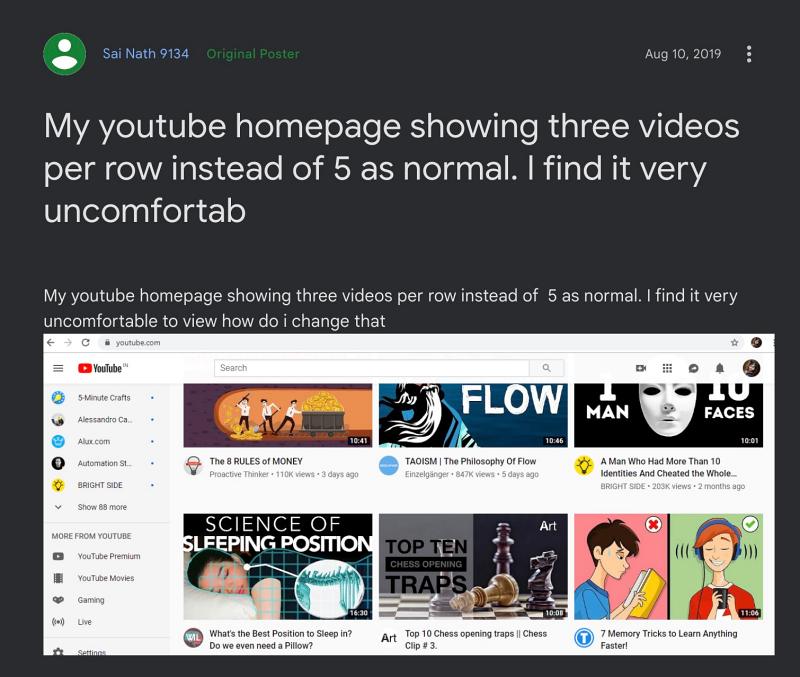
Moroever, even the thumbnail sizes have been drastically increased and you will now also get white margins on the left and right sides of your screen. But we did mage to find out a nifty workaround using which you could easily increase the number of videos from the current 3 videos per row on YouTube. So without further ado, let’s check out how this could be carried out.
- YouTube showing 3 videos per row: How to Increase it Using Script Using Extension Via Incognito
YouTube showing 3 videos per row: How to Increase it

We have listed two different methods to get this job done. Go through both of them once and then try out the one that is in sync with your requirement.
Using Script
This method requires you to download a third-party extension but will surely give you the desired output with a cent percent success rate.
- To begin with, download and install the uBlock Origin extension.
- Then click on its icon next to the URL bar and then click on Settings.
- Now add the following two lines at the end and click on Apply changes. www.youtube.com##ytd-two-column-browse-results-renderer.grid:not(.grid-disabled):style(max-width: 100% !important) www.youtube.com##ytd-two-column-browse-results-renderer.grid-6-columns:style(width: 100% !important)
- If the aforementioned script doesn’t work, then try out the below one [replace 4 with the desired number accordingly]: youtube.com##ytd-rich-grid-row, #contents.ytd-rich-grid-row:style(display:contents !important;) youtube.com##ytd-rich-grid-renderer:style(–ytd-rich-grid-items-per-row: 4 !important;)
- Even if that doesn’t work out, then try out these commands instead: youtube.com##ytd-two-column-browse-results-renderer.grid-5-columns, #ytd-two-column-browse-results-renderer.grid-6-columns:style(width: 100% !important;) youtube.com##ytd-two-column-browse-results-renderer.grid:style(max-width: initial !important;)
- Finally, restart the YouTube tab and you will be back to the old layout style.
Using Extension

If you don’t want to get your hands dirty using these codes, then you can also get this job done via an extension named YouTube Row Fixer . So, give it a try and then check if it addresses the issue or not.
Via Incognito

While it doesn’t require your interaction with any script, but the success rate might vary and it is a temporary fix. As of now, Google is testing this feature and hasn’t rolled it out for every user account. So you could try switching over to another Google account or watch in an Incognito Mode without signing in and you might get back the old UI layout.
- Bring Back Old YouTube Music Library Downloads section [Video]
- YouTube Something went wrong error on iPhone [Fixed]
- YouTube fix: For now, you can’t change the thumbnail on your Short
- Scroll not working on YouTube TV ‘Live Guide’ on Apple TV [Fix]

- Arno 1 year ago Reply Thank you so much. Step 4 worked for me. Insane that YT just forces this onto us…
- Manish Kumar 2 years ago Reply Hlo Sadique, I have a reverse problem. I clicked googles pop up of old ui. and now its 5 videos per row on yt homepage. I want to get back to 3 videos per row. How can I do that. I am not seeing any option to revert back. Please help me.
- ser_srd 3 years ago Reply Worked a treat, as my UK friends would say. Back to 5 thumbnails per row with the first lines. I would however have included the need to go to filters after going to settings. Took me a moment to see that in the screen shot.
- roni 3 years ago Reply hi i did the tutorial exactly the same and its not working. i tried to delete the command and try again but it didnt work i still have only 3 videos per line, can u help me try and make it work? Sadique Hassan 3 years ago Reply Hi Roni, could you try these two commands youtube.com##ytd-rich-grid-row, #contents.ytd-rich-grid-row:style(display:contents !important;) youtube.com##ytd-rich-grid-renderer:style(–ytd-rich-grid-items-per-row: 6 !important;)
(Cancel Reply)
Δ
